Affiliate programme: how to earn and get paid
Join the programme on the Affiliate page, share your link, and you earn 10% of every purchase made by the people who sign up through it, for as long as they keep buying. Redeem your affiliate balance by bank transfer, in crypto, or as account balance with a 15% bonus.
Written By Carmine Cella
Last updated 1 day ago
Join the programme on the Affiliate page, share your link, and you earn 10% of every purchase made by the people who sign up through it, for as long as they keep buying. Redeem your affiliate balance by bank transfer, in crypto, or as account balance with a 15% bonus.
Get your link
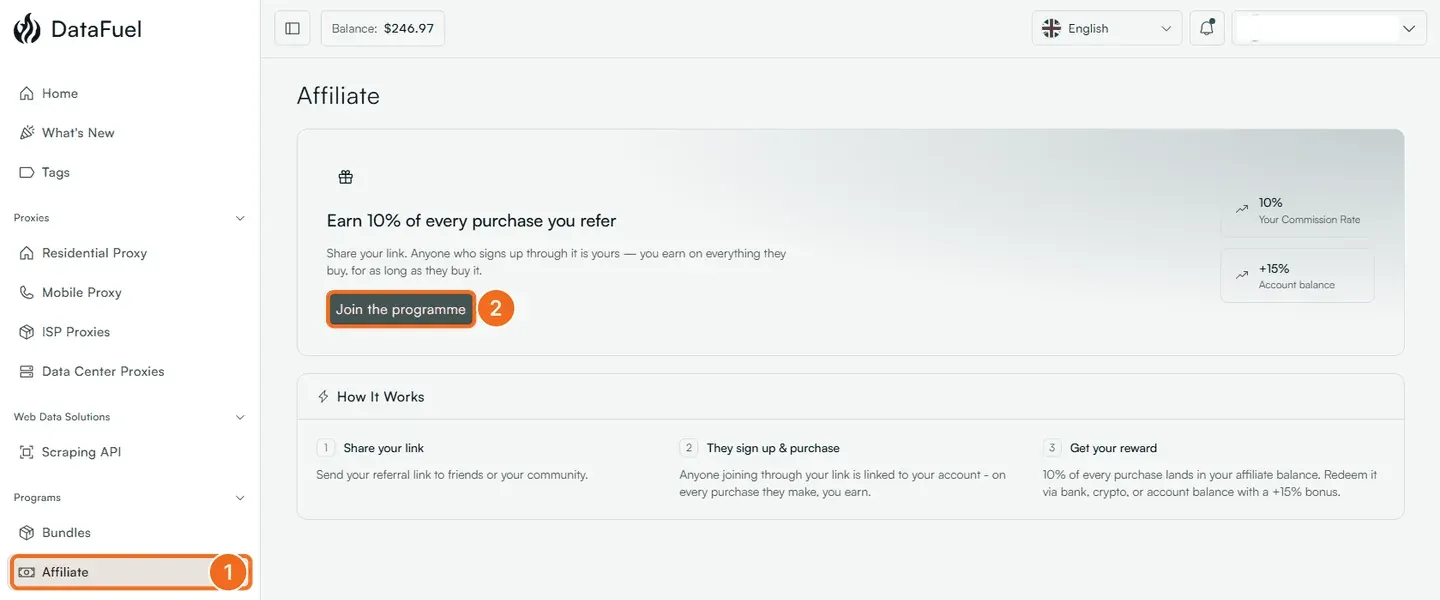
- Open Affiliate in the left menu, under Programs.
- Click Join the programme. Your referral link appears on the page; it looks like
https://dashboard.datafuel.ai/en/register?ref=AB12CD34. - Put it where your audience is: a tutorial, a newsletter, a tool directory, a repository README. Say that it is an affiliate link.
How it works
Your affiliate balance, the referred accounts and the pending and paid commissions are on the Affiliate page once you have joined.
If it did not work
- A referral is missing. The customer signed up without the link, or more than 30 days after clicking, or had already clicked another affiliate's link. Send the account email to support and we check the attribution.
- A commission disappeared. The payment was refunded or charged back within the hold.
Related
Was this helpful?
Still need help? Ask the team