Target a country, city, carrier or OS
Targeting is written into the proxy username as key-value pairs: country-us, city-losangeles, asn-7922, os-windows. Leave a parameter out and the network chooses for you; the Generate panel on the Residential Proxy page writes the username for you if you prefer.
Written By Carmine Cella
Last updated 1 day ago
Targeting is written into the proxy username as key-value pairs: country-us, city-losangeles, asn-7922, os-windows. Leave a parameter out and the network chooses for you; the Generate panel on the Residential Proxy page writes the username for you if you prefer.
In the dashboard
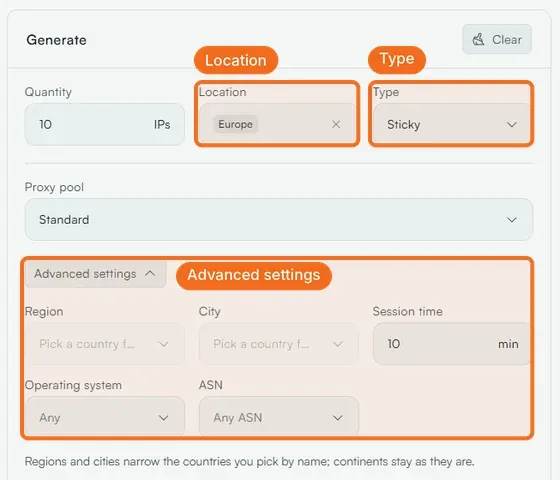
On Residential Proxy, Location takes Anywhere, a continent (Europe gives each line a different European country) or one or more countries. Type is Rotating or Sticky; Advanced settings adds Region and City (pick a country first), Session time in minutes, Operating system and ASN. Regions and cities narrow the countries you picked by name; continents stay as they are.
The parameters
Where the codes come from
Region and city values are codes, not names: california, losangeles, england. The Region and City dropdowns in the Generate panel show them; the User API lists them per country. A guessed code gives a 417 error.
Carrier codes are AS numbers without the "AS": Deutsche Telekom 3320, Comcast 7922, T-Mobile US 21928, Verizon Wireless 22394, AT&T 20057, Vodafone UK 25135, TIM 3269.
Rules worth knowing
- The pool selector (
network-residential,pool-mobile) comes first; the rest can be in any order. cityandasncannot be combined; useregionwithasninstead.ttlwithoutsessiondoes nothing.os-androidoros-iospicks a residential device with that system; for carrier IPs use the mobile pool.- Narrow targets have smaller pools: if a city gives no IP, widen one step.
Related
- Generate proxy credentials and lists
- Proxy error codes explained
- Technical reference: Targeting
Was this helpful?
Still need help? Ask the team