Your first scraping API call in five minutes
Run a page in the Playground first, then send the same request to https://scraping-api.datafuel.ai/api/v1/task with the key from Scraping API → Settings. Both return the page as Markdown.
Written By Carmine Cella
Last updated 1 day ago
Run a page in the Playground first, then send the same request to https://scraping-api.datafuel.ai/api/v1/task with the key from Scraping API → Settings. Both return the page as Markdown.
Before you start
- The scraping API activated on your account: the free plan is enough.
- A terminal with
curl, or any HTTP client.
Steps
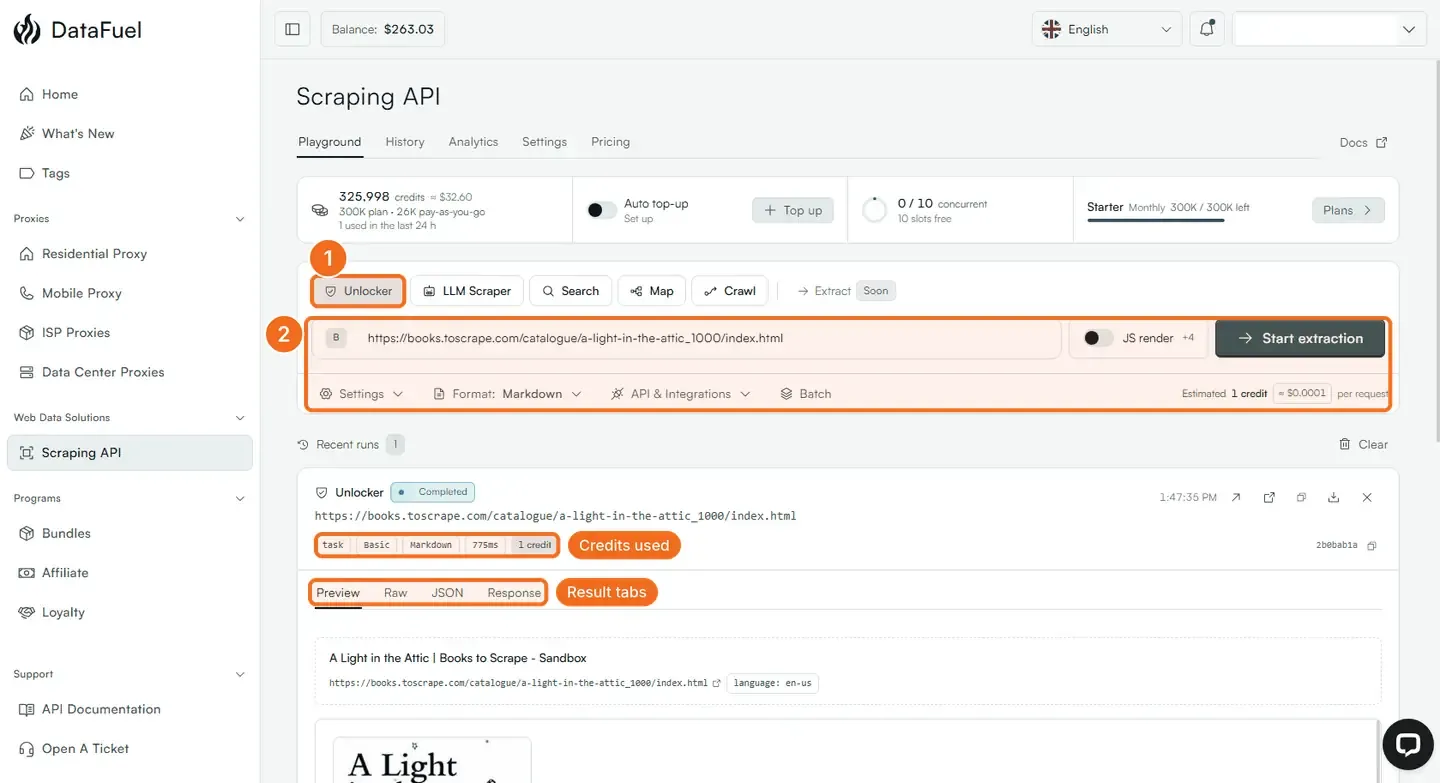
- Open Scraping API → Playground. Unlocker is the first tool tab; LLM Scraper, Search, Map and Crawl sit next to it.
- Paste a URL, keep Format: Markdown, and click Start extraction. The run appears under Recent runs as Completed, with chips for the execution type, the network (Basic), the format, the time and the credits used. Preview shows the page; Raw, JSON and Response show what the API returns.
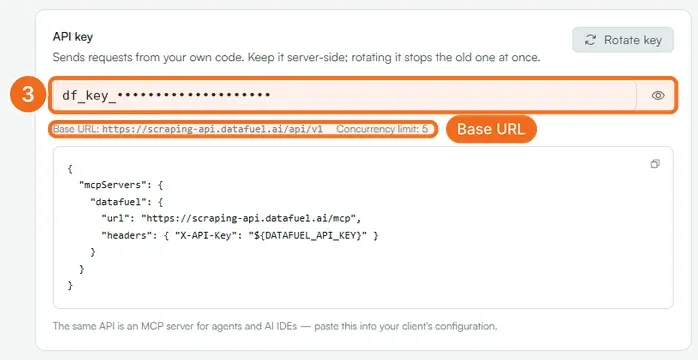
- Open Scraping API → Settings. Under API key, click the eye icon to reveal your key (it starts with
df_key_) and copy it. The same panel shows the base URLhttps://scraping-api.datafuel.ai/api/v1and your concurrency limit. - Run the same request from your terminal:
curl https://scraping-api.datafuel.ai/api/v1/task \
     --header 'X-API-Key: df_key_YOUR_KEY' \
     --header 'Content-Type: application/json' \
--data '{ "type": "unlocker", "url": "https://example.com", "proxy_type": "Basic", "result_format": "markdown" }'- Read
result.datain the answer: that is the page.credits_usedtells you what it cost;blocked: truemeans the target refused and nothing was charged. - For a protected site, run the same call with
"proxy_type": "Premium"(residential network, 10 credits).
What happens next
/task waits for the page, so set your client timeout to at least 120 seconds. JS render in the Playground adds browser rendering for pages built with JavaScript (4 credits more on top of the base price). For lists of URLs use Batch in the Playground or /job in the API; for whole sites use Crawl. History keeps every run; Analytics shows credits, success rate and cost per domain.
If it did not work
- 401. The key is missing or wrong; copy it again from Scraping API → Settings. The scraping key is not the dashboard key (
df_live_…) from Settings → API Keys. - 403. The account is deactivated or the key was rotated; check the Settings page.
- Credits charged but the result is empty. Credits are reserved when a task is queued and returned when it fails; refresh the counter after a minute.
Related
- Scrape a protected page with the Unlocker API
- API keys: create, rotate and revoke
- Technical reference: Scraping API
Was this helpful?
Still need help? Ask the team