Auto-renew: how it works and how to cancel
ISP and datacenter plans and monthly scraping API plans renew automatically unless you switch renewal off on the plan. Renewals are taken from your account balance, you get an email 7, 3 and 1 days before each charge, and switching renewal off never ends the period you already paid for.
Written By Carmine Cella
Last updated 1 day ago
ISP and datacenter plans and monthly scraping API plans renew automatically unless you switch renewal off on the plan. Renewals are taken from your account balance, you get an email 7, 3 and 1 days before each charge, and switching renewal off never ends the period you already paid for.
What renews and what does not
Turn renewal off on an ISP or datacenter plan
- Open ISP Proxies (or Data Center Proxies) and click Settings on the plan's row.
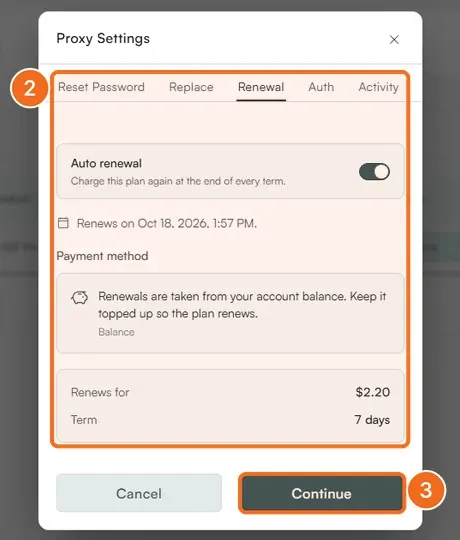
- Open the Renewal tab. It shows the Auto renewal switch, the date the plan renews on, the payment method (your balance), what it renews for and the term.
- Switch Auto renewal off and click Continue. The plan keeps running until its end date; nothing is charged after.
Through the User API: subscriptions.setAutoRenew with false.
Scraping API plans
Open Scraping API → Settings. The Plan panel shows your subscription and the allowance it renews; Upgrade or Plans changes it. A plan that is not renewed leaves you on the Free plan with any pay-as-you-go credits intact.
What happens at expiry
ISP and datacenter IPs stop accepting connections at the end of the term and return to the pool; they are not reassigned to you later, so renew before expiry if the specific IPs matter. Expired plans stay in your list until you tick Hide Expired Plans.
If a renewal fails
A renewal needs enough balance. If there is not enough, the order waits under Settings → Invoices with a Pay button; top up or pay before the deadline and the plan continues. After 30 days of non-payment the account may be closed.
Related
Was this helpful?
Still need help? Ask the team