Scrape a protected page with the Unlocker API
Send the URL to /task with "proxy_type": "Premium" and the Unlocker API handles Cloudflare, Akamai, DataDome, HUMAN and CAPTCHAs inside the request; you get the page back as Markdown, HTML, a screenshot or parsed fields, and pay only if it succeeds.
Written By Carmine Cella
Last updated 1 day ago
Send the URL to /task with "proxy_type": "Premium" and the Unlocker API handles Cloudflare, Akamai, DataDome, HUMAN and CAPTCHAs inside the request; you get the page back as Markdown, HTML, a screenshot or parsed fields, and pay only if it succeeds.
Before you start
- Your scraping key (
df_key_…), from Scraping API → Settings. - A client timeout of at least 120 seconds:
/taskwaits for the page.
Try it in the Playground first
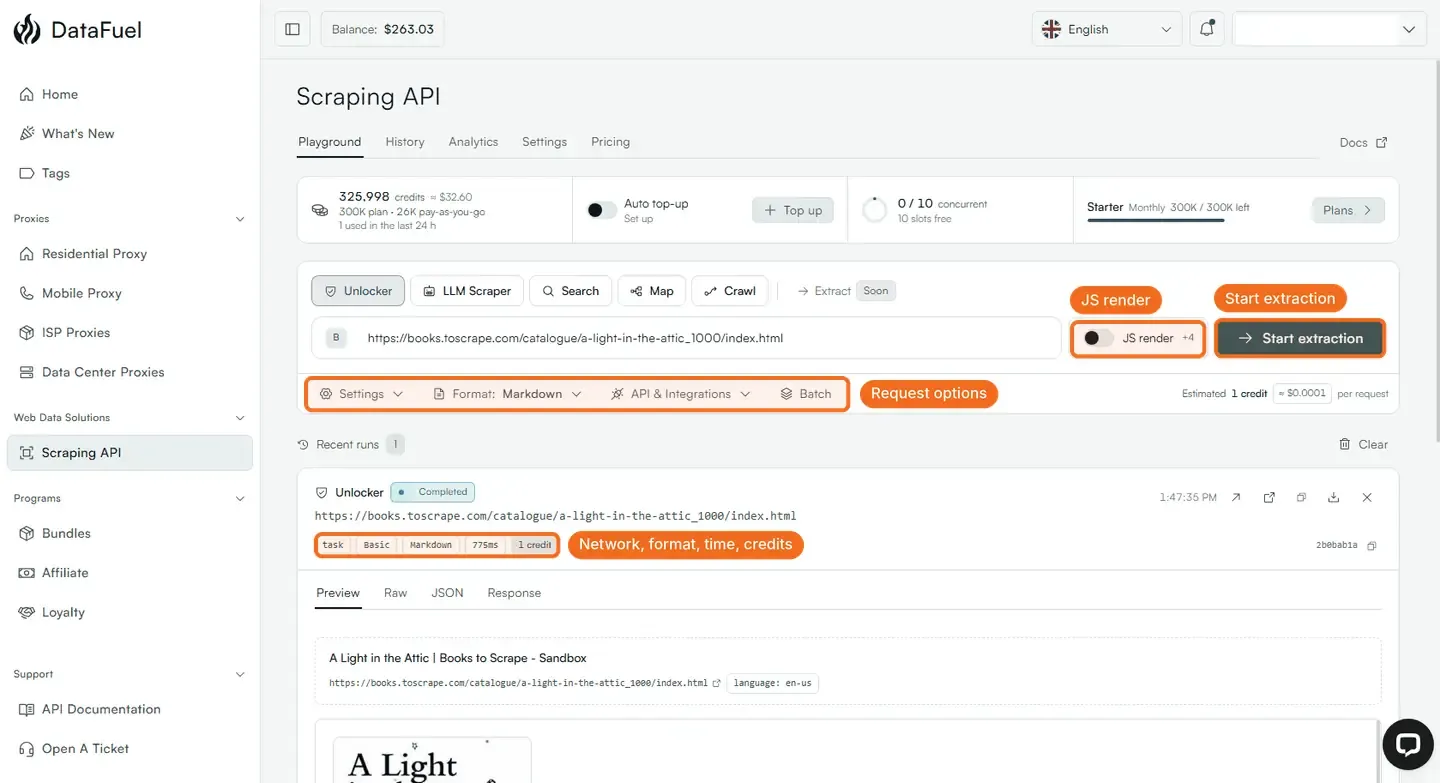
Open Scraping API → Playground, keep Unlocker, paste the URL and click Start extraction. The run under Recent runs shows the network it used (Basic by default), the format, the time and the credits. JS render switches on browser rendering; Settings next to Format holds the other request options; API & Integrations turns the same run into code for your language.
Steps
- Start on the Basic network (datacenter, 1 credit). Many pages need nothing more.
curl https://scraping-api.datafuel.ai/api/v1/task \
     --header 'X-API-Key: df_key_YOUR_KEY' \
     --header 'Content-Type: application/json' \
--data '{ "type": "unlocker", "url": "https://example.com/product/42", "proxy_type": "Basic", "result_format": "markdown" }'- If the answer says
"blocked": trueor the content is a challenge page, run it again with"proxy_type": "Premium"(residential network, 10 credits). The blocked attempt was not charged. - If the page builds its content with JavaScript, add browser rendering (5 credits on Basic, 20 on Premium) and, where needed, a wait for the element you need; the reference lists the options.
- Pick the output:
markdownfor LLM pipelines,htmlfor your own parser, a screenshot, or auto-parsed fields (links, emails, prices, tables, metadata) when you want structure without writing selectors. - Keep the request's
idfrom the response; History on the Scraping API page lists every task with its cost and status, and Analytics shows success rate and cost per domain.
Geo and sessions
Add a country, state, city or ZIP to get the page as a local user sees it, and a session id to keep the same IP across several requests of one flow (a listing page and then its detail pages).
What happens next
Credits are reserved when the task is queued and returned if it fails; the balance you see settles within a minute. For many URLs use /job with the list; it runs in the background and you poll for results.
If it did not work
- Still blocked on Premium. Try browser rendering, then a different country, then a sticky session; if it still fails, send the URL to support: hard targets get a dedicated look.
- Timeout in your client. Raise it to 120 seconds or more.
- 401 or 403. Key problems; see the API keys article.
Related
- Your first scraping API call in five minutes
- How pricing works
- Technical reference: Scrape a page, Pricing and credits
Was this helpful?
Still need help? Ask the team